Thursday, 19 September 2013

IT Technology: Will Domain Name System (DNS) Affect Browsing Experience / Internet Slow?

Yes. DNS will definitely affect your browsing experience or cause the Internet slow.

The Domain Name System (DNS) is an hierarchical distributed naming system for computers, services, or any resource connected to the Internet or a private network. It associates various information with domain names assigned to each of the participating entities. Most prominently, it translates easily memorized domain names to the numerical IP addresses needed for the purpose of locating computer services and devices worldwide. By providing a worldwide, distributed keyword-based redirection service, the Domain Name System is an essential component of the functionality of the Internet.

Improper DNS selection will cause packet drop and high latency. Thus, this will affect your browsing experience and Internet slow. 

In Malaysia, if you are using TM service, you may want to use the following DNS so that you can browse the Internet smoothly.

<<Streamyx>>
202.188.1.5 or 202.188.0.133

<<Unifi>>
1.9.1.9

In order to configure the DNS in your Windows 7 computer, please check out the website at http://windows.microsoft.com/en-my/windows7/change-tcp-ip-settings


Reference:
Domain Name System

Wednesday, 18 September 2013

AppleScript: Add or Create New Keychain

The following AppleScript allows you to add or create new a Keychain entry.

<<AppleScript>>

set _account to the text returned of (display dialog "User name" with title "Keychain by Andres Cheah, MCM" with icon note buttons {"OK"} default button 1 default answer "")
set _password to the text returned of (display dialog "Password" with title "Keychain by Andres Cheah, MCM" with icon note buttons {"OK"} default button 1 default answer "" with hidden answer)
try
set _creator to "apsr" -- Abbrevation for AppleScript
set _keychain to "Application"
set _app_keychain to "/Applications/Utilities/Keychain Access.app"
set _ac to _account & "@ABC.local"
set _label to "Twitterrific"
set _srvr to "Twitterrific"
set _pw to _password
do shell script ¬
"/usr/bin/security add-generic-password " & ¬
" -a " & _ac & ¬
" -l " & _label & ¬
" -c " & _creator & ¬
" -s " & _srvr & ¬
" -w " & _pw & ¬
" -T " & quoted form of _app_keychain & ¬
" -A " & _keychain
display dialog "You have added your Keychain successfully. Click OK to exit." with title "Keychain by Andres Cheah, MCM" with icon caution buttons {"OK"} default button 1
end try

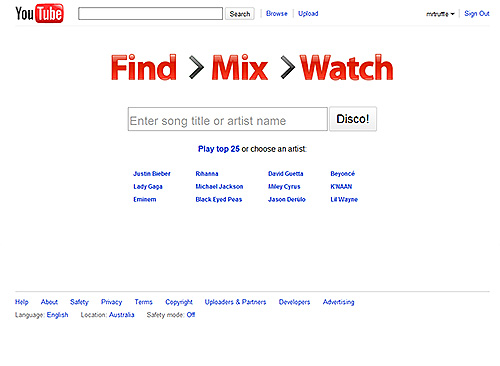
Google: YouTube Disco

YouTube's got millions of songs on its servers, and now, thanks to Vevo, a hefty slice of them are totally aboveboard. In Disco, YouTube's built an official, media-player-like front-end for all this music, with a Pandora-like discovery tool.

Disco's playlisting functionality is still a bit limited, and it's hard to tell what metrics are driving the music recommendation service, which isn't nearly as astute as Last.fm's or Pandora's. And since this is YouTube, there's a very real risk that whatever song you think has been added to your playlist could be the Alp1ne Techno-y0del remixXx of said song. But it's a minor tradeoff, because good god, YouTube has everything.


Reference:
YouTube Disco

Google: YouTube EDU


YouTube EDU brings learners and educators together in a global video classroom. On YouTube EDU, you have access to a broad set of educational videos that range from academic lectures to inspirational speeches and everything in between.

Come here for quick lessons from top teachers around the world, course lectures from top-class universities or inspiring videos to spark your imagination.


Features:
  • Learn
Visit YouTube EDU to find short lessons from top teachers around the world, full courses from the world’s leading universities, professional development material from fellow educators and inspiring videos from global thought leaders.
  • Teach
Use YouTube videos to enrich your classroom lessons. Spark a conversation. Make theoretical concepts come alive. Tap into the mind of the visual learner. See how educators like you are incorporating video into their lessons and join the YouTube Teachers community.
  • Create
Build a global classroom on YouTube EDU by creating educational videos then uploading them to your YouTube channel. Nominate a channel to be added to YouTube EDU.
  • YouTube for Schools
Access thousands of educational videos on YouTube EDU from within your school network by signing up for YouTube for Schools.


Reference:
YouTube EDU

Thursday, 5 September 2013

IT Technology: Zoho Calendar


Zoho Calendar allows you schedule, manage and track your meetings and events. Groups and teams can easily share their planned activities so everyone is on the same page, and with Zoho Calendar's powerful sharing controls, you can share only what you want to. In addition, Zoho Calendar also gives you an unified view across many Zoho Apps, from Zoho CRM appointments to Zoho Projects deadlines.

  • Group CalendarNew

This efficiently brings the team together, on a common calendar. All members can create and modify events.

  • Send and receive invitations

Invite people to events on their email address. Best thing is that invites can be sent to any email service.

  • Get reminders for events

Get event reminders on email, as a pop-up or both. We notify you up to 90 days prior to the commencement of the event.

  • Share and Embed

Share your calendar with individuals or a group. You can publish it on your website for public viewing too.

  • Subscribe and Import

You can subscribe to holiday calendars and public calendars. In addition, you can import events from friends' calendars too.

  • Mobile Access for Zoho Calendar

Access your Zoho Calendar on your mobile, from wherever you are. You can also create new events using Smart Add.

  • Associate with other applications


From Zoho Calendar, you can access other Zoho applications, which are CRM, Meeting, Business and Planner.


Reference:
1. Zoho Calender

Education: Prezi

With Prezi, you move seamlessly from brainstorming your ideas to presenting them. Create a more cinematic and engaging experience and lead your audience down a path of discovery.

  • Presentations
Prezi's zooming presentation software lets you choose between the freedom of the cloud, the security of your desktop, or the mobility of the iPad or iPhone.

And because Prezi is 3D, you can guide your audience through a truly spatial journey. Zoom out to show the overview of your prezi, zoom in to examine the details of your ideas, or simply move freely through the prezi and react to your audience’s input.

Work online or off
Work online and store your prezis in the cloud, or work offline with Prezi Desktop and keep your prezis on your own computer.

  • Meetings
Prezi makes it easy to share your ideas with your clients, colleagues, classmates, or the world. Co-edit in real time, from across the room or across the globe.

Prezi for teams
Prezi Meeting is perfect for teams. Brainstorm, create, and present your ideas in one shared virtual whiteboard. Collaborate across times zones and in real time with up to 10 colleagues.

  • Mobility
Start your prezi in the cloud, finish it on the plane, show it on your iPad or iPhone.

Sign up for our public license and get our basic cloud-based service. To work offline on your PC or Mac, check out Prezi Desktop. For ultimate mobility, download Prezi for iPad and Prezi for iPhone.

Go mobile
The touch screen is ideal for zooming into the finer details of your pitch or portfolio.


Reference:
1. Zoom into Prezi

Education: Google Apps for Education


Google Apps for Education is totally FREE!!!

Benefits

  • Security and privacy first


Google Apps for Education includes dozens of critical security features specifically designed to keep your data safe, secure and in your control. Your data belongs to you, and Apps tools enable you to control it, including who you share it with and how you share it. Our data center network provides exceptional security and guarantees* reliable access to your data, 24x7x365.25 (that’s right: no rest, even on leap years).

  • Stay connected from anywhere

With Google Apps for Education, everything is automatically saved in the cloud - 100% powered by the web. This means that emails, documents, calendar and sites can be accessed - and edited - on almost any mobile device or tablet. Anytime, anywhere.

  • Bring students, teachers and teams together

Fast, easy collaboration is what makes Google Apps unique. Our website and document creation tools offer real-time editing, powerful sharing controls, and seamless compatibility – an ideal environment for learning in the 21st century.

  • Get stuff done faster

Google Apps for Education can help streamline academic tasks like essay writing and class scheduling. A group of students can work together on a piece of work in Google Docs, seeing changes in real time rather than waiting for versions to be sent via email. Students can see exactly when their professors are available and vice verse with Google Calendar. By removing these time-consuming bottlenecks, Apps frees you up to spend more time on learning and teaching.

  • Invisible IT that just works

Spend less time managing your IT infrastructure. Your students, teachers and administrators always have access to the latest software, including the newest features and security updates. You don’t need to buy or maintain servers and everything can be managed from a single interface. And yes, it really is free.

  • Go Green

Moving to Google Apps helps reduce both your organization’s overall expenses and its environmental impact. Apps is powered by Google's energy-efficient data centers, so it’s less energy and carbon-intensive than on-premise servers.


Products

  • Gmail
Inbox space for everything, and no ads

Google Apps offers up to 30GB of storage per user, powerful spam filtering and a 99.9% uptime SLA. All hosted by Google - there’s no cost, and no ads for students, faculty or staff.

Work fast, save time
Gmail is designed to make everyone more productive. Up to 30GB of storage means no need to delete anything, powerful search means everything is in each reach, and labels and filters help your users stay organized. Gmail is securely powered by the web, so students and faculty can be productive at home, on the road, or on their mobile devices.

Connect with people, according to your rules
The inbox isn't just about messages, it's about people too. Text, voice, and video chat means that students and teachers can see who is online and connect instantly. Don’t want your students using chat? Want to limit who can send emails to whom? It’s all in the administrator’s control.

  • Calender
Easily schedule lessons and meetings
Overlay multiple calendars to see when people are available - a great way to manage staff schedules, for example. Google Calendar sends invitations and manages RSVPs.

Integrated with your school’s email
Google Calendar is integrated into Gmail and inter-operable with popular calendar applications.

Share with classes, teams and clubs
Calendars can be shared school-wide or with select colleagues. A range of sharing permission controls help maintain security and privacy.

  • Drive
Access your files anywhere
Google Drive on your Mac, PC, Android or iOS device gives you a single place for up-to-date versions of your files from anywhere.

Bring your files to life
Share individual files or whole folders with specific people or your entire team or even contractors, partners and constituents. Create and reply to comments on files to get feedback or add ideas.

Store everything for next to nothing
 Get started with up to 30GB of free space for each user. Need more? Starting at $5/user/month for 100GB, your IT team can provide up to 16TB per user.

  • Sites
Easy to build
Students can build project sites without writing a single line of code. It's as easy as writing a document. And, to save even more time, you can provide them with hundreds of pre-built templates.

System and site-level security controls
Administrators can manage site sharing permissions across the school, and authors can share and revoke file access at any time.

Works across operating systems
Google Sites works in the browser on PC, Mac and Linux computers. Teachers, students, and parents don't need buy or download software.


Reference:
1. Google Apps for Education