Thursday, 10 September 2015
Apple: iPhone 6s and iPhone 6s Plus
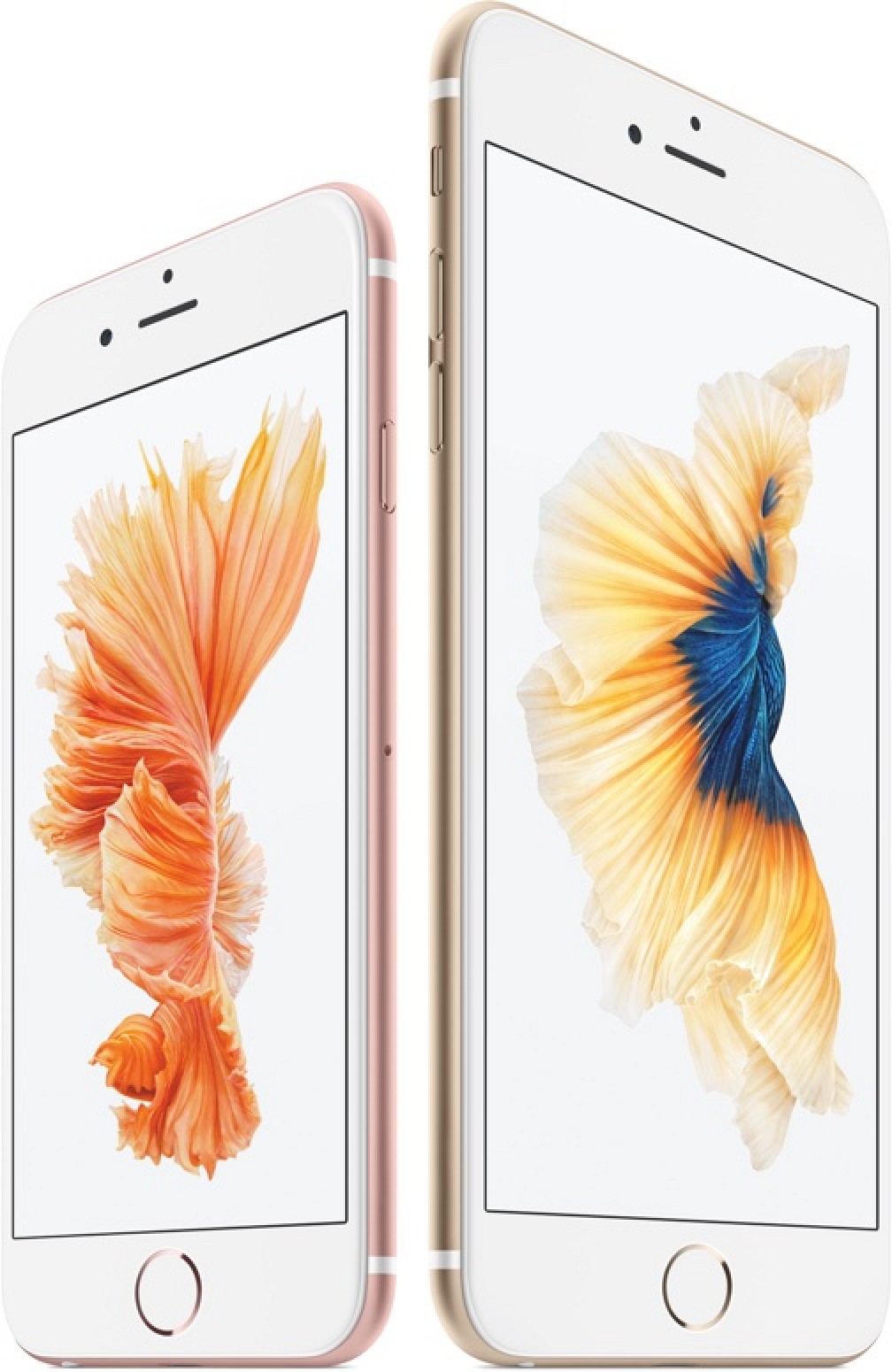
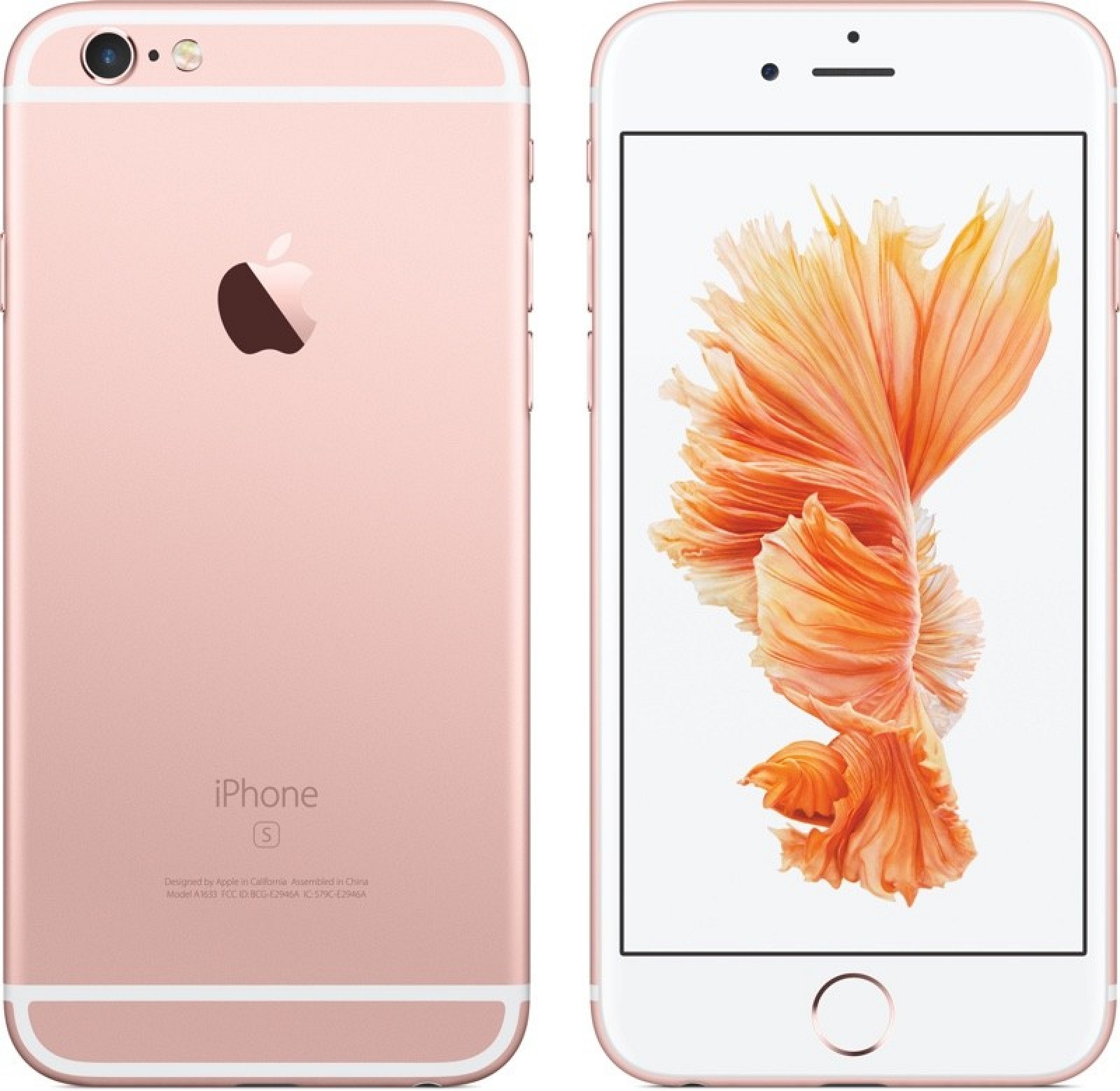
Apple introduced the next-generation iPhone 6s and iPhone 6s Plus at its media event in San Francisco on September 9. The new iPhones feature an A9 chip and M9 motion coprocessor, 3D Touch, 12-megapixel rear-facing camera, 5-megapixel front-facing camera, stronger glass and Series 7000 aluminum, faster Touch ID, Live Photos and a new Rose Gold color option.
iPhone 6s and iPhone 6s Plus are powered by an Apple A9 chip and embedded M9 motion coprocessor that deliver up to 70% faster CPU performance and up to 90% faster graphics compared to the A8 chip inside the iPhone 6 and iPhone 6 Plus.
3D Touch on iPhone is similar to Force Touch on Apple Watch, enabling users to make "peek and pop" gestures on the screen to access actionable shortcuts or preview content, such as text messages, flight information, calendar appointments and more. There's also a new Taptic Engine inside of the iPhone 6s that enables haptic feedback so you get touch-based responses when using 3D Touch.
The smartphones feature an improved 12-megapixel rear-facing iSight camera with 4K video recording and 5-megapixel front-facing FaceTime camera with true tone Retina Flash -- in low light, the front display will flash for a split second instead of using a traditional LED flash.
iPhone 6s and iPhone 6s Plus also have a second-generation Touch ID fingerprint scanner that is up to two times faster compared to Touch ID on previous iPhones.
The iPhones are crafted from Series 7000 aluminum and come in a new Rose Gold color, alongside Silver, Space Gray and Gold. Otherwise, the handsets look virtually the same as the iPhone 6 and iPhone 6 Plus, but they are slightly thicker and heavier.
The iPhone 6s retails for $199/$299/$399 for 16GB/64GB/128GB respectively on a two-year contract. The iPhone 6s Plus retails for $299/$399/$499 for 16GB/64GB/128GB respectively on a two-year contract. Carrier financing and leasing programs are also available through AT&T, Verizon, Sprint, T-Mobile and many other carriers worldwide, and Apple also announced its own iPhone upgrade program that lets users get a new iPhone each year with pricing that starts at $32.41 per month.
iPhone 6s and iPhone 6s Plus pre-orders begin on Saturday, September 12 at 12:01 AM Pacific ahead of a Friday, September 25 launch in the United States, Australia, Canada, China, France, Germany, Hong Kong, Japan, New Zealand, Puerto Rico, Singapore and the United Kingdom. The new iPhones will be available in over 130 countries by the end of the year.
Rumors about the next-generation iPhone have been trickling in for months. It's expected that Apple will continue its 2014 trend, offering the 2015 iPhone in two separate sizes -- one larger and one smaller.
We expect Apple will stick to its long running "S" naming scheme (which has been around since 2009), calling the new phones the iPhone 6s and the iPhone 6s Plus. iPhone 6s Plus is a mouthful though, so it is possible that this might be the year that we get a new naming format. One analyst believes Apple might call its next-generation phone the "iPhone 7" due to the significance of the new changes being implemented, but it's far too early in development to know for sure.
Because it's an "S" year upgrade and because the iPhone was just redesigned, the next-generation version will focus on internal improvements rather than an updated external look. Screen sizes will remain at 4.7 and 5.5 inches, and Apple is not expected to introduce a new 4-inch model.
There may be a few exterior changes, though. There's been a rumor that Apple will add a new color option to its iPhone lineup in 2015 -- pink (which may be rose gold). We've also seen two rumors suggesting Apple might opt to use the same 7000 series aluminum used in the Apple Watch in the next-generation iPhone. The aluminum is 60% stronger than standard aluminum but still lightweight.
In the past, "S" upgrades have brought features like Siri, Touch ID, new processors, and camera improvements, and we can expect to see many of the same updates with the iPhone 6s and iPhone 6s Plus. According to rumors, the new devices will gain a faster A9 processor, 2GB of RAM, a 12-megapixel rear camera with 4K video recording, and a 5-megapixel front-facing camera.
The 2015 iPhones are also expected to gain the Force Touch feature first introduced with the Apple Watch, allowing for new gestures that incorporate pressure sensitivity, and improved Touch ID to make fingerprint recognition faster.
Though the iPhone 6s and 6s Plus are expected to retain the same design as iPhone 6 and 6 Plus, the addition of Force Touch and 7000 series aluminum could slightly change the thickness and the dimensions of the iPhone 6s and the iPhone 6s Plus.
Multiple rumors and leaked schematics, and even what's said to be a fully assembled "prototype" iPhone 6s, have suggested the iPhones could be slightly thicker, by approximately 0.2mm. Renderings of the devices and a video comparison of the iPhone 6 and 6s shell indicate the iPhone 6s may be 7.1mm thick instead of 6.9mm while the iPhone 6s Plus may be 7.3mm thick instead of 7.1mm. At 0.2mm, the difference between the iPhone 6 and 6s will be nearly undetectable and most cases and accessories designed for the iPhone 6 should continue to work with the iPhone 6s.
A materials analysis of the iPhone 6s shell has confirmed that Apple is indeed using a new alloy for the device. With 5 percent zinc, it's in line with many 7000 Series aluminum alloys. A bend test on the shell suggests it's much stronger and more resistant to bending, and in addition to using a new alloy, Apple has also added reinforcement to the areas around the home button and volume buttons of the device.
The iPhone 6s and 6s Plus will continue to offer features that have become integral to the iPhone, including NFC for Apple Pay, 802.11ac Wi-Fi capabilities, and LTE Advanced. The two new phones will continue to be available with the same general storage options as the iPhone 6 and 6 Plus, with storage capacities starting at 16GB.
It's an "S" upgrade year, Apple has asked its suppliers to produce a record-breaking 85 to 90 million units of the iPhone 6s and iPhone 6s Plus combined by the end of the year. The high number of orders suggests Apple is expecting significant demand for the two devices and hoping to avoid supply shortages, but the addition of Force Touch may impact initial production numbers.
Apple plans to unveil the iPhone at a media event in San Francisco scheduled for September 9. Pre-orders, if accepted, will follow on September 11, with an official launch likely happening on September 18.
Wednesday, 9 September 2015
Microsoft: Intrasite and Intersite Replication of Active Directory
There are two types of Active Directory replication based on site topology. Intrasite and Intersite replication. In intrasite replication, all the domain controllers inside the same site will replicate each other. In Intersite replication, Selected Domain controllers of two different sites will replicate during specified interval. Domain controller which is assigned for replication over the site is called Bridge Head Servers.
<< Interval for Intrasite Replication >>
Intrasite replication occurs automatically on the basis of change notification. Intrasite replication begins when you make a directory update on a domain controller. By default, the source domain controller waits 15 seconds and then sends an update notification to its closest replication partner. If the source domain controller has more than one replication partner, subsequent notifications go out by default at 3 second intervals to each partner. After receiving notification of a change, a partner domain controller sends a directory update request to the source domain controller. The source domain controller responds to the request with a replication operation. The 3 second notification interval prevents the source domain controller from being overwhelmed with simultaneous update requests from its replication partners.
But for some of the directory updates, domain controllers will not wait for 15 seconds for replication. This situation is called Urgent Replication. Some of the directory updates such as assigning of account lockouts and changes in the account lockout policy, the domain password policy, or the password on a domain controller account etc. are example for Urgent Replication.
<< Interval for Intersite Replication >>
Intersite replication occurs between replication partners in two different sites. Active Directory preserves bandwidth between sites by minimizing the frequency of replication and by allowing you to schedule the availability of site links for replication. By default, intersite replication across each site link occurs every 180 minutes that is 3 hours. You can modify this replication interval, and it can be brought down till 15 minutes. But its always recommended to keep the default interval because the intersite replication occurs between low speed WAN links, hence reducing the replication interval could cause high network traffic and latency.
<< Interval for Intrasite Replication >>
Intrasite replication occurs automatically on the basis of change notification. Intrasite replication begins when you make a directory update on a domain controller. By default, the source domain controller waits 15 seconds and then sends an update notification to its closest replication partner. If the source domain controller has more than one replication partner, subsequent notifications go out by default at 3 second intervals to each partner. After receiving notification of a change, a partner domain controller sends a directory update request to the source domain controller. The source domain controller responds to the request with a replication operation. The 3 second notification interval prevents the source domain controller from being overwhelmed with simultaneous update requests from its replication partners.
But for some of the directory updates, domain controllers will not wait for 15 seconds for replication. This situation is called Urgent Replication. Some of the directory updates such as assigning of account lockouts and changes in the account lockout policy, the domain password policy, or the password on a domain controller account etc. are example for Urgent Replication.
<< Interval for Intersite Replication >>
Intersite replication occurs between replication partners in two different sites. Active Directory preserves bandwidth between sites by minimizing the frequency of replication and by allowing you to schedule the availability of site links for replication. By default, intersite replication across each site link occurs every 180 minutes that is 3 hours. You can modify this replication interval, and it can be brought down till 15 minutes. But its always recommended to keep the default interval because the intersite replication occurs between low speed WAN links, hence reducing the replication interval could cause high network traffic and latency.
Microsoft: Copy Incoming ( Inbox ) or Outgoing Emails ( Sent Items ) to Another Mailbox in Exchange 2007 or 2010
Occasionally you may have a requirement to copy incoming or outgoing emails for specific users to another mailbox for monitoring or compliance purposes.
To be able to do this you can use an Exchange Transport Rule.
1. First open the Exchange Management Console, expand Organization Configuration, and select Hub Transport.
2. Right click the blank space in the main window and select New Transport Rule.
3. Enter the name for your new transport rule, click Next.
4. Select the conditions you want for the rule. Select from people as a condition, and then click the underlined value people to select from which people you want the rule to apply to. Click Add, and then add the email accounts you want to copy emails from. In our example we want to copy emails from the accounts mailbox. Click OK.
5. Click Next.
6. Now select the Action for the rule, in our scenario we are going to choose Blind carbon copy (Bcc) the message to addresses, once selected, click the underlined addresses value. Click Add, select the user to Bcc the emails to, in our example we are going to Bcc the Administrator email account, click OK, click Next.
7. If you want to add an exception to the rule you can do so next, in our example we want all emails to be copied so we won’t select an exception. Click Next.
8. Then on the Configuration Summary page click New to create the rule.
9. Then on the Completion page click Finish to exit the Wizard.
10. You should now see your new Transport Rule in the Exchange Management Console.
To be able to do this you can use an Exchange Transport Rule.
1. First open the Exchange Management Console, expand Organization Configuration, and select Hub Transport.
2. Right click the blank space in the main window and select New Transport Rule.
3. Enter the name for your new transport rule, click Next.
4. Select the conditions you want for the rule. Select from people as a condition, and then click the underlined value people to select from which people you want the rule to apply to. Click Add, and then add the email accounts you want to copy emails from. In our example we want to copy emails from the accounts mailbox. Click OK.
5. Click Next.
6. Now select the Action for the rule, in our scenario we are going to choose Blind carbon copy (Bcc) the message to addresses, once selected, click the underlined addresses value. Click Add, select the user to Bcc the emails to, in our example we are going to Bcc the Administrator email account, click OK, click Next.
7. If you want to add an exception to the rule you can do so next, in our example we want all emails to be copied so we won’t select an exception. Click Next.
8. Then on the Configuration Summary page click New to create the rule.
9. Then on the Completion page click Finish to exit the Wizard.
10. You should now see your new Transport Rule in the Exchange Management Console.
Thursday, 3 September 2015
Microsoft: Spreadsheet Compare 2013
If you have access to Excel 2013 through Microsoft Office Professional Plus 2013 or through selected Office 365 subscription plans, you have access to a terrific new feature in Excel that allows you to electronically compare two workbooks and identify any differences in those workbooks. This new feature – Compare Files – is very powerful and, as you will see in this tip, is very easy to use.
To compare two Excel workbooks, begin by opening the workbooks. Then, choose Compare Files from the Inquire tab of the Ribbon and select the two workbooks you want to compare, as follows:
Upon clicking Compare in the lower right corner of the Select Files To Compare dialog box, Excel analyzes the two workbooks and generates a detailed analysis that highlights differences in data, formulas, formatting, and other characteristics. The figure below presents a sample of that analysis.
The Compare Files tool identifies differences between the two workbooks in the following fourteen areas; although for any given analysis, you can choose not to display the results of one or more of these tests.
In summary, Compare Files, a new Excel 2013 feature found on the Inquire tab of the Ribbon, offers a tremendous amount of power to help you identify, quickly and easily, the differences between two Excel workbooks. However, be aware that it is only available in certain editions of Excel 2013, so be sure to consider that when considering which version of Microsoft Office 2013 you choose to license.
To compare two Excel workbooks, begin by opening the workbooks. Then, choose Compare Files from the Inquire tab of the Ribbon and select the two workbooks you want to compare, as follows:
Upon clicking Compare in the lower right corner of the Select Files To Compare dialog box, Excel analyzes the two workbooks and generates a detailed analysis that highlights differences in data, formulas, formatting, and other characteristics. The figure below presents a sample of that analysis.
The Compare Files tool identifies differences between the two workbooks in the following fourteen areas; although for any given analysis, you can choose not to display the results of one or more of these tests.
In summary, Compare Files, a new Excel 2013 feature found on the Inquire tab of the Ribbon, offers a tremendous amount of power to help you identify, quickly and easily, the differences between two Excel workbooks. However, be aware that it is only available in certain editions of Excel 2013, so be sure to consider that when considering which version of Microsoft Office 2013 you choose to license.
IT Security: SandBlast by Check Point
Check Point is upgrading its sandboxing technology so it catches attacks earlier in the process and makes it harder for adversaries to evade detection.
Called SandBlast, the new software monitors CPU activity looking for anomalies that indicate that attackers are using sophisticated methods that would go unnoticed with traditional sandboxing technology, according to Nathan Shuchami, head of threat prevention sales for Check Point.
Traditional sandboxes, including Check Point’s, determine whether files are legitimate by opening them in a virtual environment to see what they do. To get past the sandboxes attackers have devised evasion techniques, such as delaying execution until the sandbox has given up or lying dormant until the machine it’s trying to infect reboots.
SandBlast thwarts the evasion technique called Return Oriented Programming (ROP), which enables running malicious executable code on top of data files despite protection offered by Data Execution Prevention (DEP), a widespread operating system feature whose function is to block executable code from being added to data files.
ROP does this by grabbing legitimate pieces of code called gadgets and running them to force the file to create new memory page where malicious shell code can be uploaded to gain execution privileges. This process has the CPU responding to calls that return to addresses different from where they started.
SandBlast has a CPU-level detection engine that picks up on this anomaly and blocks the activity. The engine is available either on an appliance in customers’ data centers or as a cloud service running out of Check Point’s cloud. The engine relies on features of Intel’s Haswell CPU architecture, Shuchami says.
The appliance and service had already been available for Check Point’s existing sandbox offering called Threat Emulation, and for customers who had it SandBlast is an upgrade at no extra charge. For new customers, the service costs between $3,500 and $30,000 per year per Check Point gateway. The appliances range from $27,000 to $200,000. These are the same prices Check Point charged for Threat Emulation without SandBlast.
Check Point is also introducing a feature called Threat Extraction which makes it safe to open documents quickly before they can be run through the sandbox. It converts Word documents do PDF files, which neutralizes malware they may contain, Shuchami says. It can convert PDF files to PDF files as well to reach the same end.
This makes it safe to view the content of the documents quickly while the sandbox works in the background. If the user need the original, it would be available after the sandbox found it benign, he says.
Alternatively, Threat Extraction could remove macros, Javascript, links and other potentially malicious features, but that doesn’t make files as safe as converting them does, he says.
Friday, 7 August 2015
IT Security: “Certifi-gate” Vulnerability in Android
Hours after Google and smartphone makers promised an imminent patch for the infamous Stagefright vulnerability another critical flaw in Android is being outed.
The “Certifi-gate” vulnerability allows applications to gain illegitimate privileged access rights, typically reserved for remote support applications that are either pre-installed or personally installed on Android devices.
Attackers can exploit Certifi-gate to gain unrestricted device access, allowing them to steal personal data, track device locations, turn on microphones to record conversations, and much more.
The vulnerability allows an attacker to take advantage of insecure apps certified by OEMs and carriers to gain unrestricted access to any device, including screen scraping, key logging, private information exfiltration, and back door app installation.
The root causes of these vulnerabilities include hash collisions, IPC abuse and certificate forging, which allow an attacker to grant their malware complete control of a compromised device.
The flaw affects hundreds of millions of Android devices from vendors including LG, Samsung, HTC and ZTE, according to security researchers at Check Point. The latest mega-flaw isn’t related to Stagefright, but it’s on the same scale in terms of numbers of devices (Android smartphones and tablets) affected.
All affected vendors were notified by Check Point about Certifi-gate and have begun releasing updates. Even so, fixing Certifi-gate may be even trickier than resolving the Stagefright vulnerability1.
For one thing the Certifi-gate vulnerability can only be resolved after a new software build is pushed to the device – a notoriously slow process. Even smartphones and tablets running the latest version of Android (Lollipop) are at risk.
Worse yet, resolving Certifi-gate involves updating multiple components and mobile remote support tool (mRST) plugins, according to Check Point researcher Avi Bashan.
The Certifi-gate patching process is fragmented as it relies on multiple updates from a range of different vendors (Google, OEMs and developers, especially those that make mRSTs) pushing updates.
Thursday, 30 July 2015
IT Security: Android Stagefright Vulnerability Puts 950M Devices at Risk
A full 95 percent of all Android devices -- that's about 950 million smartphones, tablets and other mobile gadgets -- are at risk from one of "the worst Android vulnerabilities discovered to date," according to enterprise mobile security firm Zimperium. The security flaw, enabled by the Android operating system's Stagefright media library, could allow hackers to access devices without users ever realizing that they've been compromised.
Because Stagefright is used for time-sensitive media processing on devices, it's implemented using C++ code rather than a more "memory-safe" language such as Java, Zimperium noted today in a blog post on its Web site. However, that code leaves it more vulnerable to memory corruption and can open up devices to potential hack attacks that can gain remote access through media files delivered by MMS (multimedia messaging service) text messages.
Zimperium said it has reported the vulnerability to Google and also submitted patches for the flaw. While Google "acted promptly and applied the patches to internal code branches within 48 hours," many millions of Android device users might not see security updates for months, if at all.
"We thank [Zimperium zLabs researcher] Joshua Drake for his contributions," a Google spokesperson told us today. "The security of Android users is extremely important to us and so we responded quickly and patches have already been provided to partners that can be applied to any device."
The spokesperson added, "Most Android devices, including all newer devices, have multiple technologies that are designed to make exploitation more difficult. Android devices also include an application sandbox designed to protect user data and other applications on the device."
The Stagefright flaw opens vulnerabilities for devices running Android version 2.2 and up, according to Drake's findings. Most at risk are devices using Android Jelly Bean (versions 4.1 through 4.3.1), which covers about 11 percent of all Android devices, due to "inadequate exploit mitigations."
"If 'Heartbleed' from the PC era sends chill down your spine, this is much worse," the Zimperium blog post noted. The targets for this attack can be anyone from prime ministers, ministers, executives of companies, security officers to IT managers and more, with the potential to spread like a virus."
Google said Android's open source foundation ensures strong security by making it possible for anyone to look for and identify potential security risks. The company also encourages researchers to look for vulnerabilities through programs such as its Android Security Rewards Program, launched earlier this year, and its Google Patch Rewards program, kicked off in 2014.
Competitors such as Microsoft, however, have criticized Google for its less-than-completely-hands-on approach to security updates. Android system and security updates are often handled by device manufacturers or network carriers rather than by Google itself.
As of June 1, Google's Android developer dashboard indicated that the majority of device users -- 39.2 percent -- are running KitKat (Android 4.4). Jelly Bean (shown above) is the second-most widely used flavor of Android, with a total of 37.2 percent of Android users.
Updates for Android devices have traditionally taken a long time to reach users, and devices older than 18 months are unlikely to even receive an update, Zimperium noted on its blog, adding that it hoped users "recognize the severity of these issues and take immediate action." End users and enterprises should contact their device manufacturers or mobile carriers, the company said.
Subscribe to:
Posts (Atom)