I have just passed my CCNA (640-802 CCNA) exam. Here are the reading materials that I have used to pass my CCNA:
Exam Dumps:
1. Cisco Acme 640-802 v2013-08-06 by Acme 649q.vce
http://www.examcollection.com/cisco/Cisco.Acme.640-802.v2013-08-06.by.Acme.649q.vce.file.html
2. Cisco ActualTests 640-802 v2013-01-28 by Spike 662q.vce
http://www.examcollection.com/cisco/Cisco.ActualTests.640-802.v2013-01-28.by.Spike.662q.vce.file.html
Lab Practice:
9tut.com
http://www.9tut.com/
Both of the exam dumps and lab practice have 100% covered all the exam questions.
References:
1. Visual CertExam Suite.3.0.1 with Patch
http://www.4shared.com/file/j9L9yyBa/
2. CCNA Routing and Switching
http://www.cisco.com/web/learning/certifications/associate/ccna/index.html
Saturday, 28 September 2013
Tuesday, 24 September 2013
AppleScript: Shut Down or Restart Your MacBook with Linux Shell Scripting
The following Linux Shell script allows you to shut down or restart your MacBook with a simple click. You can also use the script with any MacBook management software (eg. Casper) to remind your users to shut down or restart their machine.
<<Script>>
#!/bin/bash
<<Script>>
#!/bin/bash
VARIABLE=$(/usr/bin/osascript
<<-EOF
tell application
"System Events"
activate
set question to display dialog "The machine
has not been shut down or restarted for more than a week. Please shut down or
restart the machine by clicking on Shut Down or Restart." with title
"System Event by Andres Cheah, MCM" buttons {"Shut Down",
"Restart", "Cancel"} with icon caution
set answer to button returned of question
if answer is equal to "Shut Down" then
tell application "System Events"
shut down
end tell
end if
if answer is equal to "Restart" then
tell application "System Events"
restart
end tell
end if
if answer is equal to "Cancel" then
return
end if
end tell
EOF)
IT Technology: YouTube to Allow Offline Viewing in App from November 2013
YouTube videos will soon be watchable without an internet
connection, the video sharing site has revealed.
From November you'll be able to download videos to watch
later using the YouTube app on mobile devices.
Other video apps like BBC iPlayer and 4OD already let you
download videos to watch later, which auto-delete in time.
But on its Creators blog, YouTube says you'll be able to
watch videos you've downloaded as long as your device goes online at least once
every 48 hours.
The blog says: "This upcoming feature will allow people
to add videos to their device to watch for a short period when an Internet
connection is unavailable.
"So your fans' ability to enjoy your videos no longer
has to be interrupted by something as commonplace as a morning commute."
Reference:
YouTube to Allow Offline Viewing in App from November
http://www.bbc.co.uk/newsround/24144019
Friday, 20 September 2013
AppleScript: Shut Down or Restart Your MacBook
The following script allows you to shut down or restart your MacBook with a simple click. You can also use the script with any MacBook management software (eg. Casper) to remind your users to shut down or restart their machine.
<<AppleScript>>
<<AppleScript>>
set question to display
dialog "The machine has not been shut down or restarted for
more than a week. Please shut down or restart the machine by clicking on Shut
Down or Restart." with title "System Event by
Andres Cheah, MCM" with icon stop
buttons {"Shut Down", "Restart",
"Cancel"}
set answer to button returned of question
if answer is equal to "Shut
Down" then
tell application "System
Events"
shut down
end tell
end if
if answer is equal to
"Restart" then
tell application "System
Events"
restart
end tell
end if
if answer is equal to
"Cancel" then
return
end if
Thursday, 19 September 2013
IT Technology: Will Domain Name System (DNS) Affect Browsing Experience / Internet Slow?
Yes. DNS will definitely affect your browsing experience or cause the Internet slow.
The Domain Name System (DNS) is an hierarchical distributed
naming system for computers, services, or any resource connected to the
Internet or a private network. It associates various information with domain
names assigned to each of the participating entities. Most prominently, it
translates easily memorized domain names to the numerical IP addresses needed
for the purpose of locating computer services and devices worldwide. By
providing a worldwide, distributed keyword-based redirection service, the Domain
Name System is an essential component of the functionality of the Internet.
Improper DNS selection will cause packet drop and high latency. Thus, this will affect your browsing experience and Internet slow.
In Malaysia, if you are using TM service, you may want to use the following DNS so that you can browse the Internet smoothly.
<<Streamyx>>
202.188.1.5 or 202.188.0.133
<<Unifi>>
1.9.1.9
In order to configure the DNS in your Windows 7 computer, please check out the website at http://windows.microsoft.com/en-my/windows7/change-tcp-ip-settings
Reference:
Domain Name System
Wednesday, 18 September 2013
AppleScript: Add or Create New Keychain
The following AppleScript allows you to add or create new a Keychain entry.
<<AppleScript>>
<<AppleScript>>
set _account to the text returned of (display dialog
"User name" with title "Keychain by Andres
Cheah, MCM" with icon note buttons {"OK"} default button 1
default answer "")
set _password to the text returned of (display dialog
"Password" with title "Keychain by Andres
Cheah, MCM" with icon note buttons {"OK"} default button 1
default answer "" with hidden
answer)
try
set _creator to "apsr" -- Abbrevation for
AppleScript
set _keychain to
"Application"
set _app_keychain to "/Applications/Utilities/Keychain
Access.app"
set _ac to _account
& "@ABC.local"
set _label to "Twitterrific"
set _srvr to
"Twitterrific"
set _pw to _password
do shell script ¬
"/usr/bin/security add-generic-password " & ¬
" -a " & _ac & ¬
" -l " & _label & ¬
" -c " & _creator & ¬
" -s " & _srvr & ¬
" -w " & _pw & ¬
" -T " & quoted form of
_app_keychain & ¬
" -A " & _keychain
display dialog "You have added your
Keychain successfully. Click OK to exit." with title
"Keychain by Andres Cheah, MCM" with icon caution buttons {"OK"} default button 1
end try
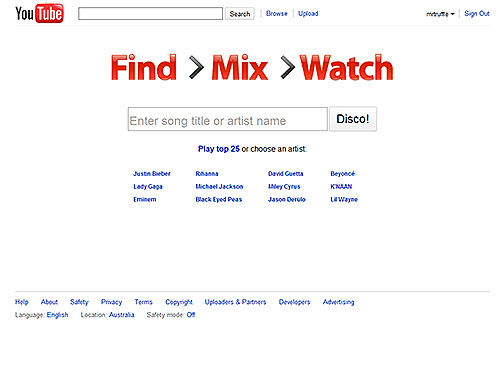
Google: YouTube Disco
YouTube's got millions of songs on its servers, and now,
thanks to Vevo, a hefty slice of them are totally aboveboard. In Disco,
YouTube's built an official, media-player-like front-end for all this music,
with a Pandora-like discovery tool.
Disco's playlisting functionality is still a bit limited,
and it's hard to tell what metrics are driving the music recommendation
service, which isn't nearly as astute as Last.fm's or Pandora's. And since this
is YouTube, there's a very real risk that whatever song you think has been
added to your playlist could be the Alp1ne Techno-y0del remixXx of said song.
But it's a minor tradeoff, because good god, YouTube has everything.
Reference:
YouTube Disco
Subscribe to:
Posts (Atom)